Free portfolio resource
Track a CS2 Skin Portfolio in a Spreadsheet
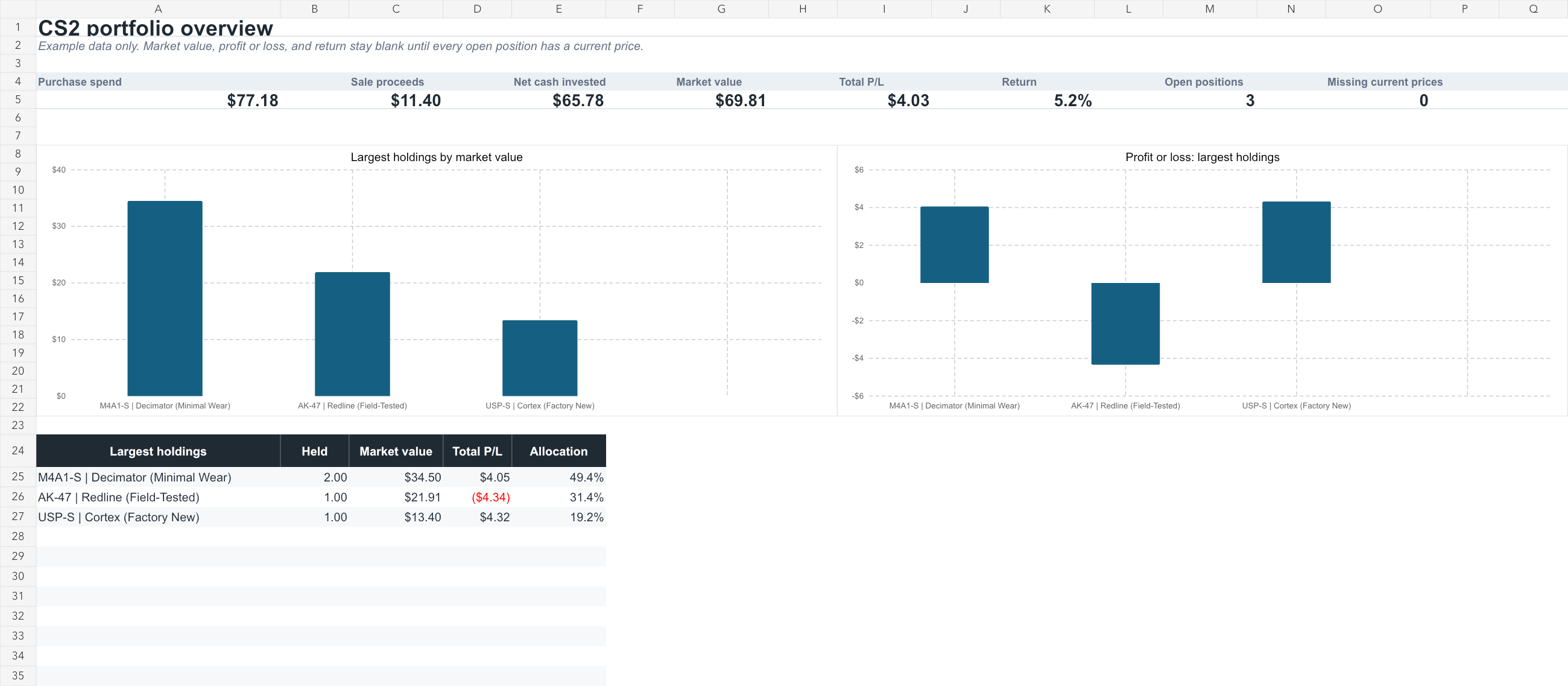
Download an Excel workbook that records buys, sells, and fees, then calculates current holdings, profit or loss, and portfolio allocation. The Overview sheet includes allocation and profit-or-loss charts.
Last updated 2026-09-05 · Reviewed by OpenSkin · 10 minutes · Beginner
Overview
The workbook tracks purchases, sales, fees, current holdings, market value, and profit or loss. Overview shows portfolio totals and charts. Portfolio shows each item, Transactions stores buys and sells, and Current prices stores the latest price you entered.
Download the portfolio tracker
Add your own skins
- Add the skin to Portfolio
Replace an example row or use the next empty row. Enter the full item name shown on Steam in Item. Product type, float, and pattern are optional.
- Record the purchase
In Transactions, add a row for the purchase. Select the same item name, choose Buy, then enter the date, quantity, unit price, fees, and marketplace. Gross amount and net cash flow calculate automatically.
- Add its current price
In Current prices, add the same item name and the current price for one item. Enter when and where you checked it. The source URL is optional.
- Check the Overview
Open Overview to see the updated totals and charts. Portfolio shows held quantity, average purchase cost, market value, profit or loss, return, and allocation for the item.