Platform rendering tutorial
Generate CS2 Skin Images from Inspect Links
Build a Node.js script that turns one CS2 inspect link into front and back PNG files.
Last updated 2026-09-04 · Reviewed by OpenSkin · 35 minutes · Intermediate
What you will build
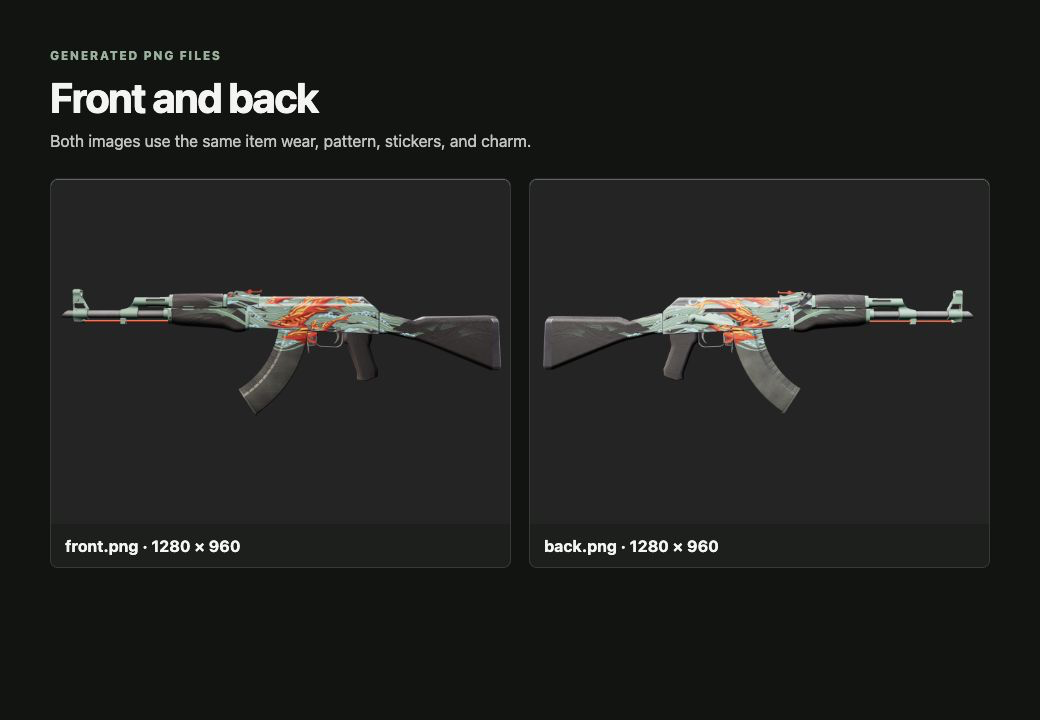
Create a Node.js script that reads the item details from one inspect link and saves matching front and back PNG files. In OpenSkin, a scene is a saved set of camera and background settings.
Before you start
- Node.js 20 or newer
- A Platform API key with inspect:read, catalog:read, render:create, and render:read
- An inspect link copied directly from a current CS2 listing
- Front and back scene IDs saved in Scene Builder
Project files
exact-item-media/
  render-item.mjs
  output/
    front.png
    back.png
Build it
- Save front and back settings
In Scene Builder, save one set of camera and background settings for the front and another for the back. Then copy both scene IDs.
- Read the inspect link once
The script reads the item details from one inspect link and reuses them for both images.
- Create the two images
The script requests one front image and one back image. The API returns an image request ID for each; the script checks those IDs until the PNG files are ready.
- Wait for completion
The script checks each job until it succeeds. It stops on failed, canceled, or timeout states.
- Save both PNG files
Completed download links expire, so the script immediately saves output/front.png and output/back.png.
- Run the script
Set the variables and run the exact command below from the project directory.
render-item.mjs
Complete inspect-to-image workflow
import {createHash} from 'node:crypto'
import {mkdir, writeFile} from 'node:fs/promises'
const API = process.env.OPENSKIN_BASE_URL ?? 'https://api-v2.openskin.dev'
const key = process.env.OPENSKIN_API_KEY
const [inspectLink, frontSceneId, backSceneId] = process.argv.slice(2)
if (!key || !inspectLink || !frontSceneId || !backSceneId) throw new Error('Set OPENSKIN_API_KEY and pass inspect link, front scene ID, and back scene ID.')

async function request(path, options = {}) {
  const response = await fetch(API + path, {...options, headers:{'X-API-Key':key, 'Content-Type':'application/json', ...(options.headers ?? {})}})
  const body = await response.json()
  if (!response.ok) throw new Error(`${response.status}: ${body.error?.message ?? 'Request failed'}`)
  return body
}

const resolved = await request('/v2/inspect/resolve-item', {method:'POST', body:JSON.stringify({link:inspectLink})})
const item = resolved.data?.render?.request
if (resolved.data?.render?.status !== 'available' || !item) throw new Error('The inspect link did not resolve to a renderable item.')

async function createRender(sceneId, view) {
  const output = {width:1280,height:960,format:'png',background:'transparent'}
  const requestKey = createHash('sha256').update(JSON.stringify({inspectLink,sceneId,view,output})).digest('hex').slice(0,24)
  const created = await request('/v2/renders', {method:'POST', headers:{'Idempotency-Key':`tutorial-${requestKey}`}, body:JSON.stringify({item, scene_id:sceneId, output})})
  return created.job.id
}
async function waitForRender(id) {
  for (let attempt = 0; attempt < 60; attempt += 1) {
    const job = await request(`/v2/renders/${id}`, {headers:{'Content-Type':'application/json'}})
    if (job.data.state === 'succeeded') return job.data.result
    if (['failed','canceled'].includes(job.data.state)) throw new Error(`Render ${id} ended in ${job.data.state}`)
    await new Promise(resolve => setTimeout(resolve, 2000))
  }
  throw new Error(`Render ${id} timed out`)
}

await mkdir('output', {recursive:true})
for (const [view, sceneId] of [['front',frontSceneId],['back',backSceneId]]) {
  const result = await waitForRender(await createRender(sceneId, view))
  const image = await fetch(result.url)
  if (!image.ok) throw new Error(`Download failed (${image.status})`)
  await writeFile(`output/${view}.png`, Buffer.from(await image.arrayBuffer()))
  console.log(`Saved output/${view}.png (1280 x 960)`)
}
Run it
export OPENSKIN_API_KEY='replace-with-your-key'
export INSPECT_LINK='replace-with-a-current-inspect-link'
export FRONT_SCENE_ID='replace-with-front-scene-id'
export BACK_SCENE_ID='replace-with-back-scene-id'
node render-item.mjs "$INSPECT_LINK" "$FRONT_SCENE_ID" "$BACK_SCENE_ID"
Expected output
Saved output/front.png (1280 x 960)
Saved output/back.png (1280 x 960)
How it works
- Both images use the item details returned by one inspect-link request, so their wear, pattern, stickers, charm, StatTrak, and name tag match.
- The two saved scenes control the camera angle and lighting.
- The API download link is temporary. The two files saved in output are the copies you keep.
Verify the result
Confirm that output/front.png and output/back.png both exist and open correctly at 1280 × 960. Both files must use the item details read from the single inspect link.
Troubleshooting
| What you see | Likely cause | What to do |
|---|---|---|
| The inspect link does not resolve | The link is old, expired, or missing item data. | Copy a current inspect link. Do not guess the missing wear or pattern. |
| 409 idempotency conflict | The unique request key was reused with different item, scene, or image settings. | Use a new request key when the item, scene, or image settings change. |
| The image download returns 403 | The temporary download link expired before the script saved it. | Run the image job again and save the result as soon as it completes. |