Platform inventory tutorial
Create a CS2 Inventory Value Report
Build an HTML report that shows a public CS2 inventory’s value by marketplace and identifies items without a current price.
Last updated 2026-09-04 · Reviewed by OpenSkin · 30 minutes · Intermediate
What you will build
Build a Node.js script that reads one public CS2 inventory and creates an HTML report with a separate total for each marketplace.
Before you start
- Node.js 20 or newer
- A Platform API key with inventory:read
- A SteamID64 with a public CS2 inventory
Project files
inventory-report/
  inventory-report.mjs
  report.html  (generated)
Build it
- Set the API key and SteamID64
Keep the API key in an environment variable. Pass the 17-digit SteamID64 when you run the script.
- Fetch the public inventory
The first successful request saves the public observation. Later ordinary reads reuse it until you explicitly refresh from Steam. Check observed_at before treating the report as current.
- Keep marketplace totals separate
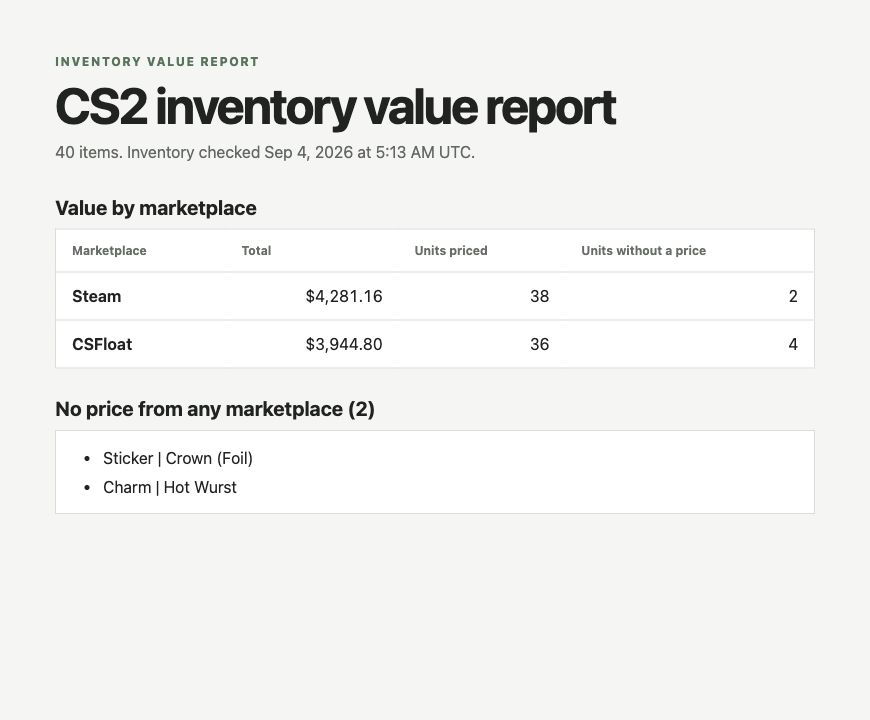
The response includes a valuation.markets list. It contains one total per marketplace, plus counts of items with and without a price.
- List items without any price
Items with no price from any marketplace remain visible in the report instead of being counted as $0.
- Open the generated report
Run the command below, then open report.html in a browser.
inventory-report.mjs
Fetch, validate, summarize, and write the report
import {writeFile} from 'node:fs/promises'
const API = process.env.OPENSKIN_BASE_URL ?? 'https://api-v2.openskin.dev'
const key = process.env.OPENSKIN_API_KEY
const steamId = process.argv[2]
if (!key) throw new Error('Set OPENSKIN_API_KEY before running the report.')
if (!/^\d{17}$/.test(steamId ?? '')) throw new Error('Pass a 17-digit SteamID64.')
const response = await fetch(`${API}/v2/inventories/${steamId}`, {headers:{'X-API-Key':key}})
const payload = await response.json()
if (!response.ok) throw new Error(`${response.status}: ${payload.error?.message ?? 'Inventory request failed'}`)
const inventory = payload.data
const markets = inventory.valuation?.markets ?? []
const unpriced = inventory.assets.filter(asset => (asset.prices?.length ?? 0) === 0)
const escape = value => String(value).replace(/[&<>"]/g, char => ({"&":"&","<":"<",">":">","\"":"""}[char]))
const money = (value, currency) => new Intl.NumberFormat('en-US',{style:'currency',currency}).format(value)
const marketplaceNames = {steam:'Steam', skinport:'Skinport', buff:'Buff163', youpin:'YouPin', csfloat:'CSFloat'}
const checked = new Date(inventory.observed_at).toLocaleString('en-US',{timeZone:'UTC',dateStyle:'medium',timeStyle:'short'}) + ' UTC'
const marketRows = markets.map(market => `<tr><th>${escape(marketplaceNames[market.marketplace] ?? market.marketplace)}</th><td>${money(market.total, market.currency)}</td><td>${market.priced_assets}</td><td>${market.unpriced_assets}</td></tr>`).join('')
const unpricedRows = unpriced.slice(0,20).map(asset => `<li>${escape(asset.item?.market_hash_name ?? asset.asset_id)}</li>`).join('')
const html = `<!doctype html><meta charset="utf-8"><title>CS2 inventory value report</title><style>*{box-sizing:border-box}body{font:16px system-ui;margin:0;background:#f5f6f4;color:#202320}main{width:min(760px,calc(100% - 40px));margin:auto;padding:54px 0}.eyebrow{color:#52745b;font-size:12px;font-weight:800;letter-spacing:.13em;text-transform:uppercase}h1{font-size:clamp(38px,7vw,50px);margin:10px 0}table{width:100%;background:white;border:1px solid #d9ddd9;border-collapse:collapse}th,td{padding:14px 16px;border-bottom:1px solid #d9ddd9;text-align:left}td{text-align:right}ul{background:white;border:1px solid #d9ddd9;padding:12px 18px 12px 42px}</style><main><div class="eyebrow">Inventory value report</div><h1>CS2 inventory value report</h1><p>${inventory.count} items. Inventory checked ${escape(checked)}.</p><h2>Value by marketplace</h2><table><thead><tr><th>Marketplace</th><th>Total</th><th>Units priced</th><th>Units without a price</th></tr></thead><tbody>${marketRows || "<tr><td colspan=4>No marketplace totals are available.</td></tr>"}</tbody></table><h2>No price from any marketplace (${unpriced.length})</h2><ul>${unpricedRows || "<li>None</li>"}</ul></main>`
await writeFile('report.html', html)
console.log(`Wrote report.html for ${inventory.count} items and ${markets.length} marketplaces`)Run it
export OPENSKIN_API_KEY='replace-with-your-key'
node inventory-report.mjs 76561198000000000

Open report.html in your browser.
Expected output
Wrote report.html for 40 items and 2 marketplaces

Marketplace   Total       Units priced   Units without a price
Steam         $4,281.16   38             2
CSFloat       $3,944.80   36             4
How it works
- Each marketplace gets its own total because the same item can have a different price on each market.
- The priced and unpriced counts are item quantities for price records returned by that marketplace. They may not add up to the full inventory when that marketplace returned no record for some items.
- The inventory checked time comes from observed_at, the last Steam observation. Ordinary reads reuse the saved snapshot; use force_refresh=true when a user explicitly requests a new observation. A later privacy change is discovered only when Steam is checked.
Verify the result
Open report.html and confirm that the number of items matches the inventory count returned by the API. Each marketplace row must show its own total plus counts of items with and without a price.
Troubleshooting
| What you see | Likely cause | What to do |
|---|---|---|
| 401 or 403 | The API key is missing, expired, or does not include inventory access. | Create a key with inventory:read and pass it as OPENSKIN_API_KEY. |
| Inventory unavailable | The Steam inventory is private or Steam did not return it. | Test with the 17-digit Steam ID for an account whose inventory you can view while signed out. |
| No marketplace totals are available | The inventory returned no current marketplace prices. | Show the items without a price. Do not substitute a $0 total. |