Platform integration tutorial
Build a CS2 Marketplace Item Page
Combine catalog identity, free marketplace prices, and an embedded 3D preview in a runnable Node.js item page.
Last updated 2026-09-15 · Reviewed by OpenSkin · 30 minutes · Intermediate
What you will build
Build one marketplace-style item page, not a complete marketplace. The free Pricing API supplies recorded asks; the paid Platform resolves catalog identity and supplies the hosted 3D session. This starter previews standard weapon finishes. Exact owned items, checkout, payments, custody, accounts, and trading are outside this example.
Before you start
- Node.js 20 or newer and mkcert installed for a trusted local HTTPS certificate.
- A Platform API key with catalog:read, render:create, and scenes:read. Keep it on your server.
- A saved scene from your Platform Scene Builder, using a weapon-compatible camera. Copy its scene ID. Scene setup has its own usage costs.
- An account with Platform access. Each successful run uses one catalog lookup (1 unit) and one viewer session (5 units). The free v1 price lookup needs no key and consumes no Platform units. At $1 per 1,000 PAYG units, six units cost $0.006; plan allowances may apply. Retries or scene setup are additional.
Project files
marketplace-item/
  server.mjs
  index.html
  localhost.pem (generated)
  localhost-key.pem (generated)
Build it
- Prepare a saved scene and scoped key
Use an existing scene in your account with a weapon-compatible camera. The key needs all three scopes listed below. Do not paste the key into index.html or commit it.
- Create the two files
Copy server.mjs and index.html below into a new directory. The server fetches once at startup, so browser reloads do not create more metered sessions.
- Enable local HTTPS
Install mkcert following its official instructions at https://github.com/FiloSottile/mkcert, then run the commands below. mkcert -install adds a local development CA to your machine. Keep its private key private. An HTTP parent origin is rejected by the hosted viewer.
- Start and verify
Supply the scene ID and API key, start the server, and open the HTTPS address. Catalog lookup errors stop startup. Pricing and viewer failures are shown independently so one does not hide the other.
server.mjs
Server-only API requests and local HTTPS delivery
import {createServer} from 'node:https'
import {readFile} from 'node:fs/promises'

const api = process.env.OPENSKIN_BASE_URL ?? 'https://api-v2.openskin.dev'
const pricing = process.env.PRICING_BASE_URL ?? 'https://api.openskin.dev'
const key = process.env.OPENSKIN_API_KEY
const scene = process.env.OPENSKIN_SCENE_ID
const name = process.env.ITEM_NAME ?? 'AK-47 | Redline (Field-Tested)'
if (!key || !scene) throw new Error('Set OPENSKIN_API_KEY and OPENSKIN_SCENE_ID.')

// Validate local files before making any metered requests.
const [cert, privateKey, page] = await Promise.all([
  readFile('localhost.pem'), readFile('localhost-key.pem'), readFile('index.html'),
])
async function request(url, options = {}) {
  const response = await fetch(url, {...options, signal: AbortSignal.timeout(60000)})
  const body = await response.json()
  if (!response.ok) throw new Error(response.status + ': ' + (body.error?.message ?? body.message ?? 'API request failed'))
  return body
}
const headers = {'X-API-Key': key, 'Content-Type': 'application/json'}
const query = new URLSearchParams({q: name, limit: '100'})
const catalog = await request(api + '/v2/catalog/items?' + query, {headers})
const item = catalog.data.items.find(entry => entry.market_hash_name === name)
if (!item) throw new Error('Exact item not found. Check the full Steam market name, including exterior.')
const render = item.render
if (item.stattrak || item.souvenir || render?.family !== 'weapon' || !['validated', 'published', 'approved'].includes(render.availability)) {
  throw new Error('This starter requires a standard, renderable weapon finish. Use inspect resolution for exact owned items.')
}
// This is a representative catalog preview, not an individual sale listing.
const state = {}
if (render.wear.supported) {
  const wear = Number(render.wear.default)
  if (render.wear.default == null || !Number.isFinite(wear)) throw new Error('Catalog wear default is missing.')
  state.wear = wear
}
if (render.pattern.supported) {
  if (!Number.isInteger(render.pattern.default)) throw new Error('Catalog pattern default is missing.')
  state.pattern = render.pattern.default
}
const identity = {family: render.family, definition_index: render.definition_index}
if (render.paint_index != null) identity.paint_index = render.paint_index

let prices = []
let priceError = ''
try {
  const quotes = await request(pricing + '/v1/prices?' + new URLSearchParams({item: item.market_hash_name}))
  prices = Object.entries(quotes.prices ?? {}).flatMap(([marketplace, quote]) =>
    typeof quote?.ask === 'number' && Number.isFinite(quote.ask)
      ? [{marketplace, ask: quote.ask, checked: quote.updated_at ?? null}] : [])
} catch (error) { priceError = error.message }

let reviewUrl = null
let viewerError = ''
try {
  const receipt = await request(api + '/v2/viewer/sessions', {
    method: 'POST', headers, body: JSON.stringify({scene_id: scene, item: identity, state}),
  })
  const review = new URL(receipt.session.review_url)
  if (review.protocol !== 'https:') throw new Error('Expected an HTTPS viewer URL.')
  reviewUrl = review.href
} catch (error) { viewerError = error.message }

// Whitelist browser fields. Never return the key, ticket, or full session receipt.
const result = {name: item.market_hash_name, catalogId: item.id, state, prices, priceError, reviewUrl, viewerError}
createServer({cert, key: privateKey}, (req, res) => {
  res.setHeader('Cache-Control', 'no-store')
  res.setHeader('X-Content-Type-Options', 'nosniff')
  res.setHeader('Referrer-Policy', 'no-referrer')
  if (req.method !== 'GET' || !['/', '/item'].includes(req.url)) {
    res.writeHead(404).end('Not found')
    return
  }
  res.setHeader('Content-Type', req.url === '/item' ? 'application/json' : 'text/html; charset=utf-8')
  res.end(req.url === '/item' ? JSON.stringify(result) : page)
}).listen(Number(process.env.PORT ?? 8090), '127.0.0.1', function () {
  console.log('Open https://localhost:' + this.address().port)
})
index.html
Accessible item details, marketplace table, and hosted 3D iframe
<!doctype html>
<html lang="en">
<head>
  <meta charset="utf-8">
  <meta name="viewport" content="width=device-width,initial-scale=1">
  <meta name="referrer" content="no-referrer">
  <title>CS2 marketplace item page</title>
  <style>
    :root {color-scheme:dark; font-family:system-ui,sans-serif; background:#181818; color:#ddd}
    body {margin:0; padding:24px} main {max-width:1000px; margin:auto}
    h1 {font-size:clamp(24px,5vw,40px)} p {line-height:1.6}
    iframe {display:block; width:100%; height:480px; border:1px solid #444; border-radius:6px}
    table {width:100%; border-collapse:collapse} th,td {padding:12px 8px; text-align:left; border-bottom:1px solid #444}
    .table {overflow:auto} a {color:inherit} :focus-visible {outline:2px solid #b2a46c; outline-offset:4px}
    @media(max-width:600px) {body {padding:16px} iframe {height:320px} th,td {font-size:13px}}
  </style>
</head>
<body><main>
  <h1 id="name">CS2 marketplace item page</h1>
  <p id="status" role="status">Loading item details...</p>
  <p>Catalog preview, not a sale listing. Wear and pattern are representative defaults, not an owned item's exact state.</p>
  <p id="state"></p>
  <section aria-label="3D item preview" id="viewer"></section>
  <h2>Recorded marketplace asks</h2>
  <p id="price-status" role="status"></p>
  <div class="table"><table>
    <thead><tr><th>Marketplace</th><th>Ask (USD)</th><th>Checked</th></tr></thead>
    <tbody id="prices"></tbody>
  </table></div>
  <p>Prices describe the market-name variant above, not a guaranteed quote for the preview's exact pattern or wear.</p>
</main>
<script type="module">
const status = document.querySelector('#status')
try {
  const response = await fetch('/item')
  if (!response.ok) throw new Error('Could not load item details.')
  const item = await response.json()
  document.querySelector('#name').textContent = item.name
  document.querySelector('#state').textContent = 'Preview wear: ' + (item.state.wear ?? 'not applicable') + '; pattern: ' + (item.state.pattern ?? 'not applicable')
  status.textContent = item.viewerError ? '3D unavailable: ' + item.viewerError : 'Item details loaded. The 3D viewer loads separately below.'
  if (item.reviewUrl) {
    const url = new URL(item.reviewUrl)
    url.searchParams.set('parentOrigin', location.origin)
    const frame = document.createElement('iframe')
    frame.title = 'Interactive 3D preview of ' + item.name
    frame.allowFullscreen = true
    frame.src = url.href
    document.querySelector('#viewer').append(frame)
  }
  document.querySelector('#price-status').textContent = item.priceError
    ? 'Prices unavailable: ' + item.priceError
    : item.prices.length ? 'One recorded ask per available marketplace.' : 'No current asks are available.'
  for (const quote of item.prices) {
    const row = document.createElement('tr')
    const checked = quote.checked ? new Date(quote.checked) : null
    for (const value of [quote.marketplace, new Intl.NumberFormat('en-US', {style:'currency', currency:'USD'}).format(quote.ask), checked && !Number.isNaN(checked.getTime()) ? checked.toLocaleString() : 'Not provided']) {
      const cell = document.createElement('td')
      cell.textContent = value
      row.append(cell)
    }
    document.querySelector('#prices').append(row)
  }
} catch (error) { status.textContent = error.message }
</script></body></html>
Run it
cd marketplace-item
mkcert -install
mkcert -cert-file localhost.pem -key-file localhost-key.pem localhost 127.0.0.1
export OPENSKIN_API_KEY="YOUR_SCOPED_KEY"
export OPENSKIN_SCENE_ID="YOUR_SAVED_SCENE_ID"
node server.mjs
# Open https://localhost:8090
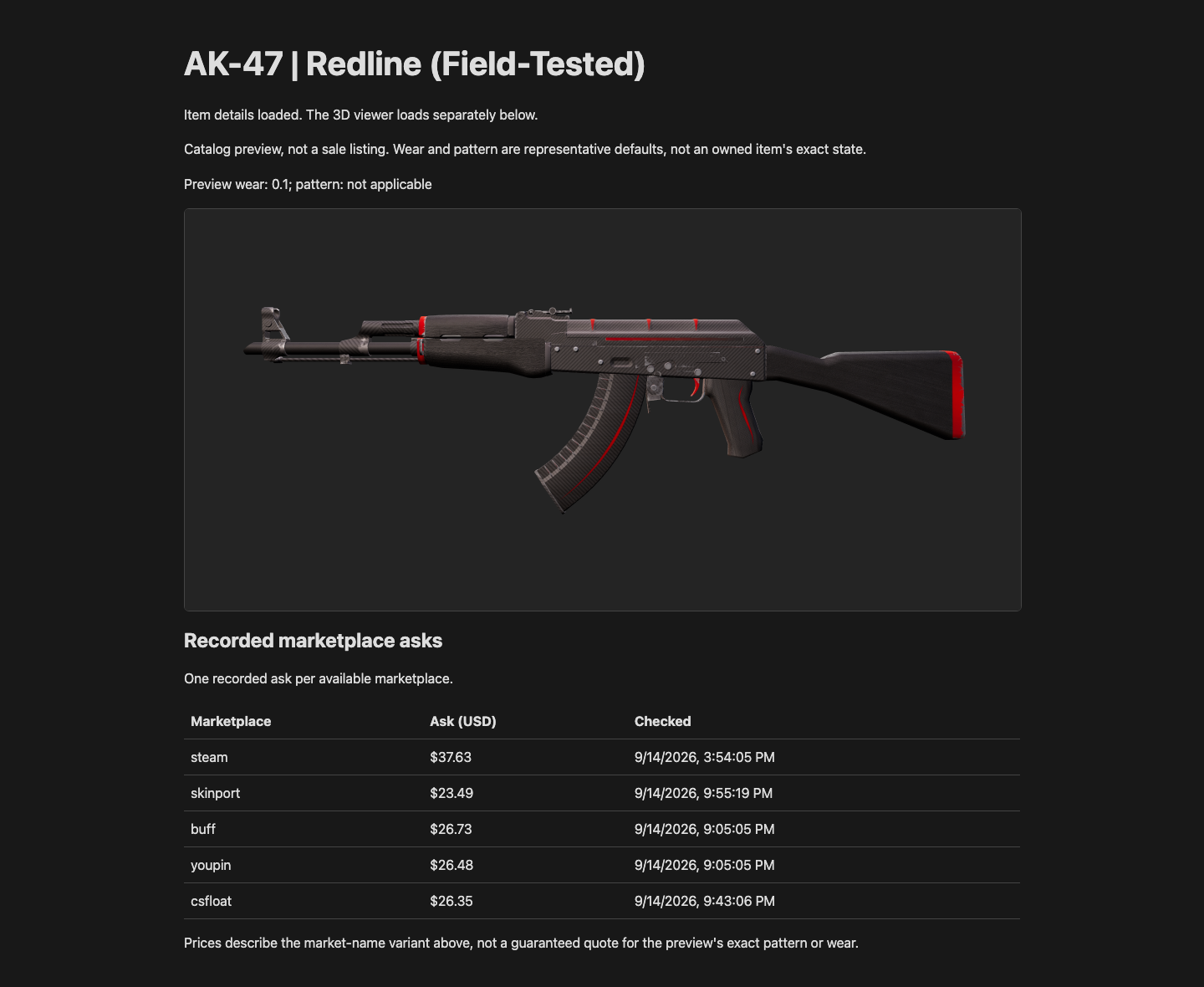
Expected output
Open https://localhost:8090

AK-47 | Redline (Field-Tested)
Recorded marketplace asks
Marketplace    Ask (USD)    Checked
[Available marketplace rows use live response values]
[Interactive 3D catalog preview]
How it works
- The full Steam market name selects one catalog item. Rendering uses the returned render contract, not a guessed paint index. Unsupported variants fail explicitly instead of becoming a Standard preview.
- Only the review URL and display fields reach the browser. The iframe uses the same protected hosted renderer as Platform integrations; this tutorial changes no rendering code.
- The server binds to loopback and is a local starter, not a publicly deployable multi-user backend. Before public hosting, add authentication, bounded session creation and application-specific caching. Never expose an unlimited session-creation endpoint.
- Restarting the server repeats metered calls and refreshes its snapshot. Reloading the browser does not. Review URLs expire; obtain a new session when needed rather than constructing asset URLs. Treat review URLs as capabilities and keep them out of logs and analytics.
- The default wear and pattern illustrate the catalog finish. A market-name price is not an exact float, sticker, or pattern valuation. Use inspect-link resolution when presenting an actual owned item.
Verify the result
Open https://localhost:8090. Confirm the exact item name, separate marketplace asks and checked times, and a fully rendered interactive 3D preview. Drag to rotate the item. Missing prices must not appear as $0; a viewer error must leave the price table readable. Browser requests must never include your Platform key.
Troubleshooting
| What you see | Likely cause | What to do |
|---|---|---|
| 401 or 403 | Invalid key, missing scope, or inaccessible scene. | Check the same-account scene ID and all three key scopes. Do not move the API key into browser code. |
| Exact item not found or unsupported preview | Incorrect full market name or a non-standard/non-renderable item. | Start with the documented Redline name. This starter intentionally rejects StatTrak, Souvenir, and non-weapon families rather than misrepresenting them. |
| 3D frame rejected or certificate warning | HTTP parent origin or an untrusted local certificate. | Use https://localhost:8090 with the trusted mkcert certificate. Do not disable TLS verification or use a wildcard parentOrigin. |
| Prices missing | Price lookup failed or no source returned an ask. | Read the message and retry later. An absent quote is not a zero price; the 3D preview can still be used. |
| Viewer unavailable or expired | Session creation failed, the saved camera is incompatible, or the review capability expired. | Check the displayed error and scene camera, then restart once to request a new session. Do not loop retries; each run can consume units. |